Path-traced quality
The settings that decide how clean a path-traced image gets, and how fast
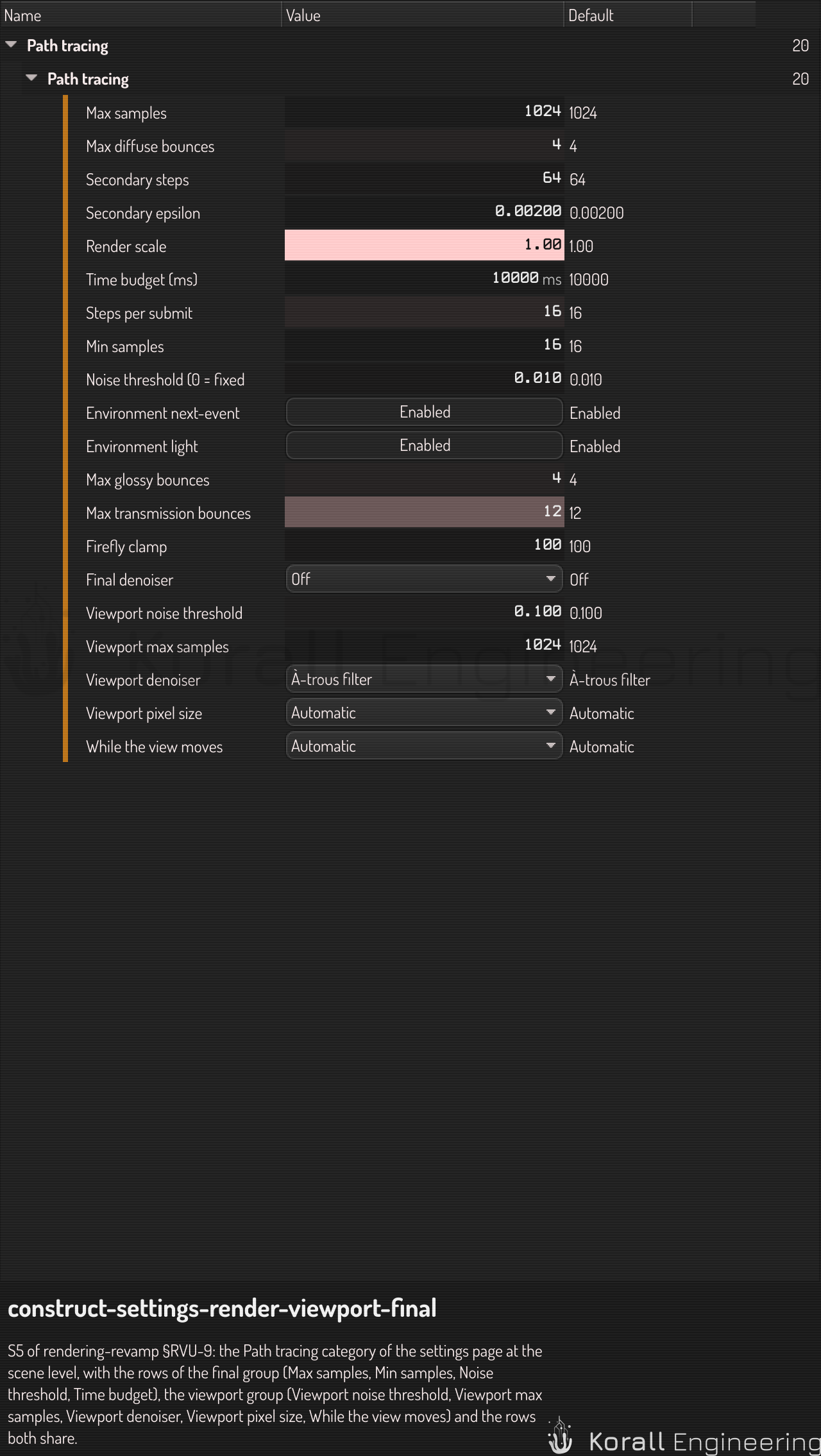
The path tracer makes an image from many random samples per pixel. Each sample adds a little light, so the image starts grainy and gets cleaner as the samples add up. The settings on this page decide when a pixel has enough samples, how far each path goes, what the tracer does with rare bright paths, and which denoiser removes the noise that is left.
All of them are in the Path tracing category of the settings page (Ctrl+,). Like every rendering setting, each one can be set for the app, for a scene, for one camera, or for one render job.
The viewport and the final render
The settings come in two groups:
- The viewport group applies to the viewport while it path traces, in a viewport mode with path tracing on such as Presentation. Its rows are the four that start with "Viewport", and While the view moves. A render job does not read them.
- The final group applies to an export, a
construct renderand a still that OPAL asks for: Max samples, Min samples, Noise threshold, Time budget (ms) and Final denoiser.
The bounce limits, the firefly clamp and the light sampling apply to both. So the viewport can stop early with a coarse threshold while the final render goes on to a clean image of the same light.
When a pixel stops: the noise threshold
The tracer measures the noise of each pixel as it goes. It compares the average of all the pixel's samples with the average of every second sample. Where the two agree, more samples would change little, so the pixel stops. A pixel also keeps going while one of its eight neighbors is still noisy.
| Setting | Default | What it does |
|---|---|---|
| Noise threshold | 0.01 | In an export, a pixel stops when its noise falls below this. Lower is cleaner and slower. 0 keeps a fixed sample count |
| Min samples | 16 | In an export, the samples every pixel takes before the threshold applies |
| Max samples | 1024 | In an export, the ceiling: a pixel stops here even if it is still noisy |
| Viewport noise threshold | 0.1 | The same in the viewport, where a coarser image is enough while you work |
| Viewport max samples | 1024 | The ceiling in the viewport. 0 has no ceiling |
A frame of an export stops when 99.9 % of its pixels have stopped, or at Max samples, or at the Time budget. The badge of the viewport shows the noise level as it falls.
Smooth, evenly lit areas reach the threshold in a few dozen samples. Soft shadows, glossy reflections and small bright lights need many more, and get them, because each pixel decides for itself.
How far a path goes: the bounce limits
A path bounces from surface to surface until it leaves the scene or reaches a limit. Each kind of bounce has its own limit, so a reflection in a mirror does not use up the bounces that light a shadow.
| Setting | Default | Raise it when |
|---|---|---|
| Max diffuse bounces | 4 | Shadows and corners look too dark |
| Max glossy bounces | 4 | Reflections of reflections look black |
| Max transmission bounces | 12 | Glass behind glass looks black. Each pane takes two |
After the second bounce, a path with little light left may end early, at random. The tracer weighs the paths that go on, so the image stays correct and the time goes where the light is.
Bright specks: the firefly clamp
A rare path can find a small, bright light by chance and add a speck that takes thousands of samples to average out. Firefly clamp (default 100) limits the light that one sample can add through a bounce. Light that comes straight from a lamp or the sun to the surface is never clamped, so highlights keep their strength.
Lower the clamp when specks remain. Lower values also darken bright caustics, the light that glass and polished metal focus. 0 turns the clamp off.
The presets
The Draft, Standard and Final presets of the settings page set the final group's sample counts, its noise threshold, its denoiser and the bounce limits in one step:
| Preset | Max samples | Min samples | Noise threshold | Bounces | Final denoiser |
|---|---|---|---|---|---|
| Draft | 64 | 8 | 0.1 | 2 | À-trous filter |
| Standard | 512 | 16 | 0.02 | 4 | OIDN |
| Final | 4096 | 32 | 0.005 | 8 | OIDN |
The denoisers
A denoiser removes the grain that the samples leave. It reads three images of the frame: the light, the color of the surfaces (the albedo) and the direction of the surfaces (the normals). So it keeps the edges of objects and the patterns of materials, and smooths the noise between them.
| Denoiser | What it is | Cost |
|---|---|---|
| À-trous filter | The edge-avoiding à-trous wavelet filter of Dammertz and others (2010): five passes of a blur that stops at edges of the normals, the depth and the color. It divides the light by the albedo first, so a pattern in a material stays sharp | Small. It runs on every frame of the viewport |
| OIDN | The rt network of Intel Open Image Denoise, with its published weights, run in the application's own compute shaders. No CUDA or other second GPU interface is needed |
Larger. It gives the cleaner image, and it takes more time |
In the viewport
Viewport denoiser has three choices:
| Choice | What the viewport does |
|---|---|
| Off | Shows the raw samples. Use it to judge the noise, or to find the source of fireflies |
| À-trous filter | Filters every frame, from the first sample. The default |
| À-trous, then OIDN | Filters every frame. When the view has 64 samples, converges or is paused, the network runs over the frame. After that it runs again every 2 s while the samples grow. While it runs, the tracer waits and the badge says "Denoising" |
The denoise button on the toolbar turns the viewport denoiser off, and on again with the last choice that was not Off. It shows only while the viewport path traces. When the viewport mode sets denoise, the button changes the mode's switch.
In the final render
Final denoiser has three choices: Off, À-trous filter and OIDN. The default is Off. It runs on each frame when the frame stops. The Draft preset chooses À-trous filter, and the Standard and Final presets choose OIDN.
- Choose OIDN for the images that you keep. It gives the cleanest image of the three.
- Choose À-trous filter for a fast draft, such as a long animation that you only want to check.
- Choose Off when you want the raw samples, for example to compare two settings.
construct render --denoise off|atrous|oidn and the denoise input of the
OPAL task view.snapshot take the same three values. Without them, the
scene's Final denoiser applies.
A denoiser does not replace samples. With very few samples it has little to work from, so lower the noise threshold first, and let the denoiser remove what is left.
While the view moves
When you orbit, pan or zoom, the viewport traces a coarse image at once, and refines it when you stop. A coarse frame shows its pixels as blocks, and the badge says "Moving · 1/4" for a frame at a quarter of the resolution.
| Setting | Default | What it does |
|---|---|---|
| Viewport pixel size | Automatic | The size of a traced pixel on the screen: 1×, 2×, 4× or 8×. Larger is faster and coarser. Automatic follows the pixel ratio of the display |
| While the view moves | Automatic | Coarse trace always traces. Material shading always shows the Environment-lit PBR engine. Automatic traces, and shows that engine when even the coarsest trace is too slow |
Where the light comes from
At every bounce the tracer sends shadow rays toward the light, instead of waiting for a random bounce to find it:
- The sun and the lamps. The sun of the physical sky is a small disc, 0.53 degrees across, as the real sun is, so its shadows have a soft edge that grows with the distance from the object that casts them. The lights of the other lighting presets are points, with hard shadows.
- The sky. When a scene or its environment changes, the tracer measures how bright each part of the sky is, and then aims more of its shadow rays at the bright parts. A sky-lit scene gets cleaner faster. Environment next-event estimation turns this off, which is useful only to compare.
- Glowing objects. An object whose material emits light is a light too: the tracer aims shadow rays at it. Up to 64 glowing objects get this, the brightest first. The rest still light the scene, with more noise.
See also
- Ray-marching quality: the marching settings that the tracer shares with the viewport.
- Export a rendered animation: the final group at work, and the progress of a running render.
- Construct rendering modes: the viewport modes and the render engines.