Mesh and tet volume items
The tones, the edges, the fields and colormaps, and two items in one place
Status: Complete Last Updated: 2026-10-15
This page tells how the viewport colors and lights a tri mesh item and a tet volume item. It also tells what the viewport does where two items cover the same surface.
The two tones
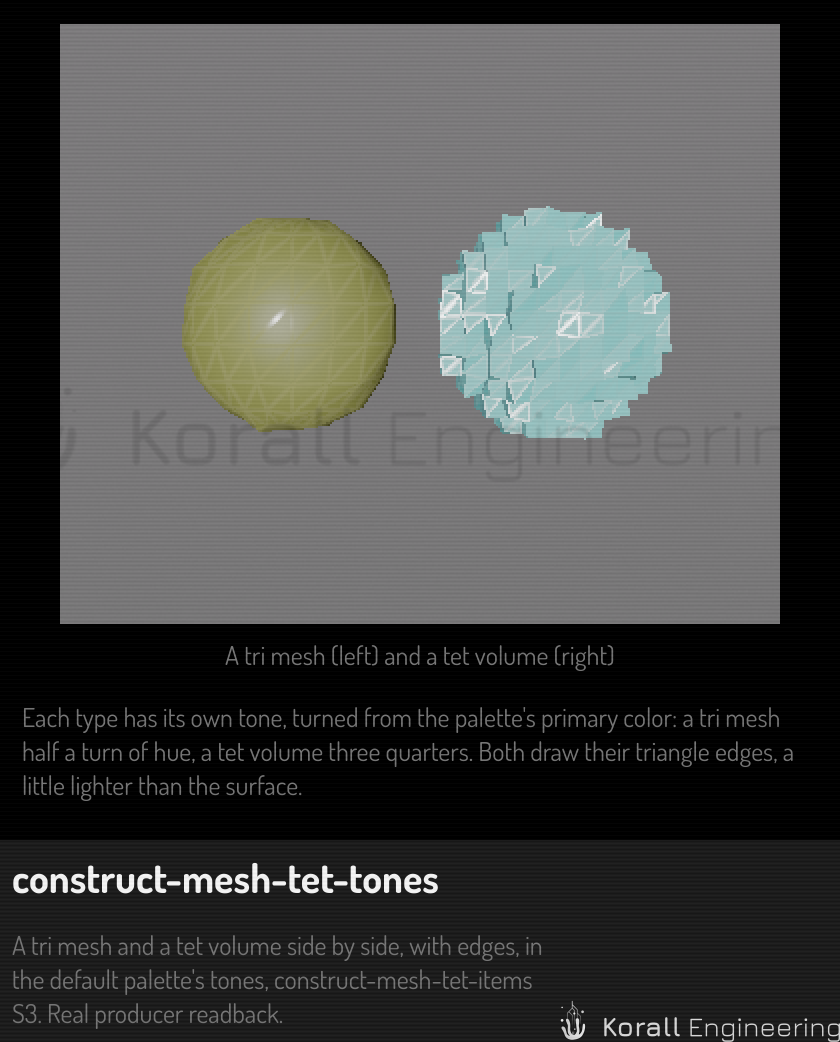
Each item type has its own tone. A tone comes from the primary color of the palette, which is the highlight color of the edition you run.
| Type | Tone |
|---|---|
| Tri mesh | The primary, turned by half a turn of hue |
| Tet volume | The primary, turned by three quarters of a turn of hue |
The turn happens in CIE LCh, so the lightness that you see does not change with the hue. Each tone also gets its own lightness, between L* 35 and 80. The palette chooses the two lightness values that keep the primary and the two tones far apart. The test is a CIE76 difference of at least 25 between each pair, in normal vision and under protanopia, deuteranopia and tritanopia. Each edition's seed passes it.
The tones are not stored. When the palette changes, the tones change with it, in the viewport and in the scene tree.
What colors an item
The first rule that applies wins:
- A field. The item shows a scalar field of its asset through a colormap. See Fields.
- A material. If you give the item a material that differs from the default, its albedo colors the item.
- The tone of the item type. The default gray material never shows on a mesh or a tet volume.
Edges and light
Both types draw the edges of their triangles. A tet volume draws the triangles of its boundary and of the caps of its cut planes. The edge color is the surface color, lighter by 15 in CIELAB L*. Both types use one shading function, so a tet volume and a mesh baked from it look the same.
| Part | Diffuse weight | Roughness |
|---|---|---|
| Surface | 1.0 | 0.6 |
| Edge | 0.6 | 0.25 |
The edge is less diffuse and smoother than the surface, so it looks shinier.
A tri mesh shades smooth across edges under 45 degrees. A tet volume shades
flat. A mesh item can store its own angle as creaseAngle in its type data.
A boundary bake of a tet volume stores 0, so it shades flat and looks the
same as the volume.
A highlight does not change these colors. A hovered or selected mesh or tet volume shows its outline only.
Fields
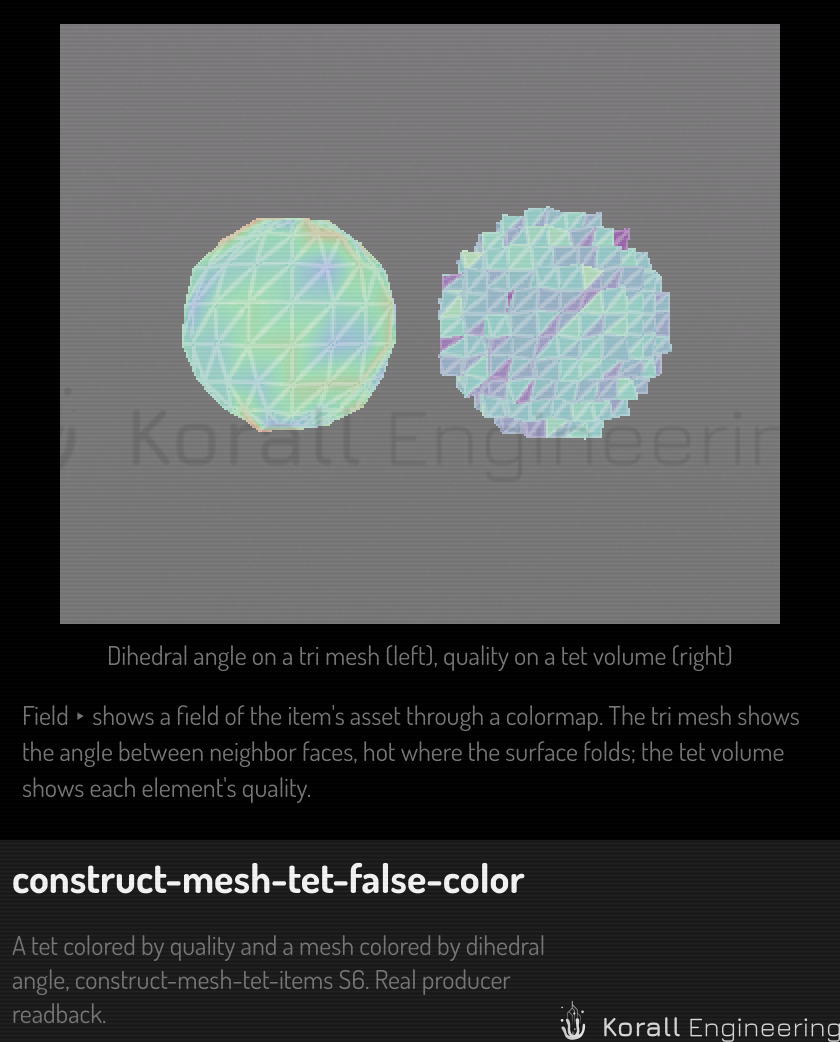
A field is a named value for each element or each vertex of an item's asset. An element field colors each triangle flat. A vertex field blends the color across each triangle. A vector field shows as its length.
| Type | Fields every item has | Range |
|---|---|---|
| Tet volume | quality: the shortest edge of a tet over its longest |
0 to 1 |
| Tet volume | volume: the volume of each tet |
Its minimum to its maximum |
| Tet volume | depth: the number of tet layers from the boundary |
Its minimum to its maximum |
| Tri mesh | dihedral: the largest angle between the two faces of an edge, at each vertex, in degrees |
0 to 30, in the heat colormap |
The other fields come from the asset file, for example the result of a simulation. A field with one value only shows the middle of its colormap.
The fields of a file are a field set. Each field has a descriptor: its
name, its arity (scalar, vector or symmetric tensor), its location (node or
element), its unit, its frame and its axis. A derived field is a
field kernel over the stored fields, for example the
kernel von_mises over the stress tensor. The viewport runs the kernel on
the GPU, and the hover and OPAL run it on the CPU, from one text, so they
give the same value.
To color an item, use the Field row of its box, or Mesh ▸ Field or
Tet ▸ Field in its menu. To color an item from OPAL, use the task
construct.presentation.add or construct.presentation.set. A new field
keeps the colormap and resets a manual range.
Presentation
What an item shows of its fields is its presentation: an ordered list of
presenters, in the item's type data as presentation. Each entry is a map
{kind, id, enabled, params}. params holds only the parameters that
differ from the default. An item with no presenter stores no key.
| Kind | Mesh | Tet volume |
|---|---|---|
color |
Yes | Yes |
deform |
No | Yes |
markers |
Yes | Yes |
threshold |
No | Yes |
cut |
No | Yes |
ghost |
No | Yes |
glyphs |
Yes | Yes |
probes |
Yes | Yes |
setup |
No | Yes |
An item has at most one color presenter. The model refuses a kind that the
item type does not take, and gives the reason. construct.presentation.kinds
lists each kind with its parameters. Every kind draws.
A presenter that draws nothing stays in the list, and says why. The reasons, in the order they are checked:
- The presenter is hidden.
- Its field is not in the item's field set, for example after a solve that did not write it.
- Its field has an arity that the kind does not take.
deformtakes a vector field,thresholda scalar field, andglyphsa vector or a tensor field. The other kinds take any field, and a vector shows as its length. - A
ghosthas nodeformwith a scale that is not 0. - The kind has nothing to show: a
deformwhose scale is off, aprobespresenter with no probe, acutwith every plane off or with planes that keep nothing, athresholdthat no element passes, asetupwith no solve setup, orglyphson the section with no plane that cuts.
construct.presentation.add and construct.presentation.set refuse a field
of an arity that the kind does not take, and change nothing.
The color presenter has these parameters:
| Parameter | Values | Default |
|---|---|---|
field |
A field name, or a kernel over named inputs, for example {"kernel": "von_mises", "inputs": {"tensor": "stress"}} |
None |
colormap |
auto, or a colormap id. See Colormaps |
auto |
rangeMode |
auto, full, robust, manual, targets |
auto |
percentile |
50 to 100: the high end of a robust range |
95 |
rangeMin, rangeMax |
The two ends of a manual range |
0 and 1 |
targetLow, targetHigh |
The target T and the over-built threshold U of a targets range |
2 and 4 |
cap |
The high end of a one-sided range. 0 uses the cap of the kernel, 15 for the factor of safety | 0 |
symmetric |
auto, on, off. On makes the range plus and minus the largest absolute value |
auto: on for a signed field |
scale |
linear, log. A range that holds 0 or a negative value refuses log |
linear |
bands |
0 for smooth, or 2 to 24 | 0 |
outOfRange |
distinct, clamp, hide. See Values outside the range |
distinct |
unit |
auto, or a unit of the same dimension. The legend and the hover text change. The colors do not change |
auto |
lighting |
bounded, flat. See Values outside the range |
bounded |
The deform presenter of a tet volume moves each node by a vector field
times a scale. The vertex shader moves the node, so a change of the scale
or of the animation phase uploads nothing. The cut planes test the rest
shape, and the box of the item, which frames the camera and places the
gizmo, stays the rest shape's.
| Parameter | Values | Default |
|---|---|---|
field |
A vector field: a name or a kernel reference | displacement |
scaleMode |
auto, true (a scale of 1), custom, off |
auto |
autoFraction |
0.01 to 0.5: the largest motion as a fraction of the box diagonal | 0.1 |
preset |
0.5x, 1x, 2x, 5x: a factor on the automatic scale |
1x |
customScale |
The scale of custom |
1 |
animate |
true runs the view clock: the shape moves between rest and deformed |
false |
cycle |
pingPong (rest, deformed, rest), full (−1 to 1, for a mode shape), once |
pingPong |
period |
Seconds per cycle, 0.1 to 60 | 2 |
loadFollowsAnimation |
true: while the shape moves, the colors show the field at the load of the phase |
true |
axis |
The axis of the results that axisStep selects a value of: a mode, a time step or a load case |
empty |
phase |
0 to 1 of the cycle, or an expression such as = fract(time / 2) |
not set: the view clock |
axisStep |
The index of a value of axis, or an expression such as = anim.frame / 10 |
not set: the item's axis value |
phase and axisStep can hold an expression, as an item's parameters can.
The item keeps them as the parameters presentation.<presenter>.phase and
presentation.<presenter>.axisStep, so they evaluate on every frame of the
timeline and of a render, they save with the scene, and an edit is one undo
step. A phase sets the phase whatever animate says. A value past 0 or 1
holds at that end, so = anim.frame / 120 deforms over 120 frames and holds.
A render that steps an axis gets the fields of each value it reaches before
it starts, and one render steps one axis.
The scale shows as a multiplier, for example "×280 (auto)", in the presenter's row and on the legend. A field in world axes turns into the item's axes first, so an item's own scale does not scale the motion twice. The normals of a moved face come from the moved triangle.
The ghost presenter draws the rest shape over the moved one, translucent
(style translucent) or as its edges (style wire). It draws only while
a deform presenter moves the item, and it takes no click.
The markers presenter puts an anchored label at the extremes of a field:
a dot at the place, a leader line and the value, in the unit of the item's
legend.
| Parameter | Values | Default |
|---|---|---|
field |
A field reference. Empty: the field of the color presenter |
empty |
show |
auto, min, max, both. auto is the kernel's choice: max for a stress or a displacement, min for a factor of safety, both for another signed field |
auto |
peaks |
0 to 20: the highest local peaks, each labeled "Peak 1: …" | 0 |
scope |
visible: the parts that the cut planes or the threshold remove take no part. all: the whole item |
visible |
A marker on a deformed volume moves with its place. A marker whose place a surface hides draws at 40 % opacity with a dashed leader. When the legend of the item ends at a percentile, a label marks the true maximum too.
The cut presenter of a tet volume cuts it with up to six planes. Each plane
is perpendicular to one axis of the item. A part shows when it is on the
kept side of every plane that is on. The cap of each plane is the face of
the cut. It shows the field with the surface's colormap, range and kernel,
and the other planes clip it. The caps move with a deformed part.
| Parameter | Values | Default |
|---|---|---|
planes |
JSON text: a list of up to six {axis, offset, flip, enabled}. axis is 0 (X), 1 (Y) or 2 (Z), offset is in the item's units, flip keeps the other half |
one plane on Y at 0 |
caps |
true draws the faces of the cuts |
true |
The threshold presenter of a tet volume shows only the elements where a
scalar field passes a test. The elements that stay make a closed surface.
| Parameter | Values | Default |
|---|---|---|
field |
A scalar field reference. Empty: the field of the color presenter |
empty |
test |
auto, below, above, between. auto is below for a field whose kernel marks its smallest value, such as the factor of safety, and above for any other field |
auto |
value |
The bound, the low bound of between. With auto: the value that a quarter of the elements are below (below) or above (above) |
0 |
value2 |
The high bound of between |
0 |
For a field at the nodes, an element passes below when its smallest node
value does, and above when its largest node value does. A threshold and
the cut planes work together: an element shows when it passes the
threshold and is on the kept side of every plane.
The probes presenter holds the pinned points of an item, in the item's
own axes. Each probe shows as a label with its name and the value of the
shown field, and the Probes tab lists every field at each probe. A probe of
a mesh lies on its surface.
| Parameter | Values | Default |
|---|---|---|
points |
JSON text: one object {xyz, ids, snap, labels}, where xyz holds three numbers for each probe |
empty |
lines |
JSON text: a list of line probes {id, a, b, samples, fields} |
empty |
To change the probes, use the Probes tab or the construct.probe.* tasks.
Each change is one undo step. See
Probe values.
Values at a point
The value of a field at a point comes from the sampler. It finds the tetrahedron that holds the point and the weights of its four corners. A derived field (a kernel such as von Mises) is computed at the corners first, and then the value is weighted. So the value is the color that the viewport shows at that point. A field of the elements gives the element's value. A point outside the volume has no value.
The hover readout of a tet volume that shows a field adds one line, for example "von Mises 182.4 MPa (interpolated)", and the legend marks the value with a tick. The first hover on a large volume says "Locating…" while the search tree builds. On a deformed volume, the hover reads the value of the material point under the cursor: the point of the part as modeled that moved there.
Axis values
The fields of an item can vary over an axis: a load case, a mode, a time
step or an iteration. Every presenter of the item shows one value of each
axis. The item stores the values in typeData.presentationAxes, a map of
axis id to value index. An axis with no entry shows its first value.
The view clock can play an axis. It shows ten values a second and then
starts again from the first value. A play changes no document. While an
axis plays, the range of full and robust is the range of all the
axis's values, so the legend does not change between values. The scale of
a deformation is the largest motion over every value, in a play and out of
one. A play holds a value until the fields of the next value are built.
construct.view.clock reads and sets the view clock: running pauses or
starts it, phase fixes the phase of a deformation's cycle, speed scales
its time (1 is real time, from 1/16 to 16), and axisStep shows an axis
value in the view only. A resume goes on from the time of the pause. Its
answer names the axes that play in playing. It makes no undo step.
While the clock runs, only the tet volumes and the meshes move. The SDF items keep the image of their last ray march, and each frame copies it in under the moving items: a frame of an animation marches no SDF again. A camera move or a change of an SDF item marches again. The clock ticks about 30 times a second, on a whole number of the display's refreshes. It stops while its window is in the background, hidden or minimized.
| Task | What it does |
|---|---|
construct.presentation.kinds |
Lists each kind, its parameters, its item types and its maximum per item |
construct.presentation.list |
Lists the presenters of item in order. Each has drawn, and the reason when it does not draw |
construct.presentation.add |
Adds a presenter of kind to item, with optional params and index. Returns its id, for example color-1 |
construct.presentation.remove |
Removes the presenter id from item |
construct.presentation.move |
Moves the presenter id of item to index |
construct.presentation.set |
Changes the params of the presenter id, or shows or hides it with enabled. Returns the resolved display of a color presenter |
construct.presentation.set_axis |
Sets the value index of the axis axis that every presenter of item shows. Refuses an axis that the field set does not have |
construct.field.sample |
The values of fields (field references; none: the shown field) at point of a tet volume, in the item's axes or with frame world. Each value has its unit, how it came to be (interpolated, snapped, element, outside) and its order. order field reads a Tet10's ten nodes |
construct.field.extremes |
The smallest (kind min), the largest (max) or the highest peaks (peaks, n, separation) of field, each with its place |
construct.field.quantile |
The weighted quantile q of field over the surface or the volume (scope) |
construct.field.range |
The smallest and the largest finite value of field, shown or not, with their places and the count of NaN values |
construct.view.labels |
The anchored labels of the viewport as they show: each with its text, its place in world and on the screen, whether its dot and its text draw, and whether a surface hides it |
construct.legend.set |
Changes a legend, given as its index or as the ids of its items: range (mode, percentile, min, max, targets as [T, U], symmetric, scale), colormap, bands, outOfRange, unit. One undo step over each item that shares the legend |
Each task that changes the presentation is one undo step.
Field information
An item can describe each field of its asset in its fieldInfo map: a
label, a unit and a frame. A solve writes the information of its four
fields (see Solve a tet volume).
The computed fields of the table above carry theirs from the code.
| Key | Meaning |
|---|---|
label |
The name that the Field row, the Field menu and the legend show, for example "von Mises stress (nodes)" |
unit |
mm, MPa, °, or empty for none |
frame |
For a vector: world when it is in world axes |
The range and the colormap are not field information. They are parameters
of the color presenter.
construct.scene.get_item reports fieldInfo for a mesh or a tet volume.
It also reports presentation, and for an item with a field set,
fieldSet: the descriptors of the fields, the axes, the producer and the
located extremes.
One display rule
The tet layer, the mesh layer, the legend and OPAL use one rule to choose
what a field shows. The rule reads the color presenter. For each part, the
first that applies wins:
| Part | Order |
|---|---|
| Colormap | The presenter's colormap, then the field's own, for example heat for the dihedral angle, then fos-bands for a targets range, then cool-warm for a signed field, then viridis |
| Range mode | The presenter's rangeMode, then the default of the field's kernel: robust for a stress such as von Mises stress, targets for the factor of safety, full for the others |
| Label | The field information's label, then the label of the field or of its kernel, then the field name |
| Range mode | The two ends |
|---|---|
full |
The field's own minimum and maximum |
robust |
The field's minimum, and the value at percentile. The legend gives the true maximum over the bar |
manual |
rangeMin and rangeMax |
targets |
0 and the cap. The bands of fos-bands meet at 1, T and U |
Then the cap limits the high end of a full or a robust range, and
symmetric makes the range plus and minus its largest absolute value.
construct.presentation.set reports the result as display, and
construct.view.legends lists the legends that the viewport shows, with the
same values. Each legend also has its rangeMode, its percentile or its
targets, symmetric and displayUnit.
Colormaps
Each colormap is a file that ships with the application. The file name is the colormap's id. Each file names where its table comes from and its license. "Original" in the table means a table made for this application.
| Id | Kind | Source, license | Use |
|---|---|---|---|
viridis |
Sequential | van der Walt and Smith, CC0 | The default for a field that is not negative |
cividis |
Sequential | Nuñez and others, 2018, CC0 | Tuned for readers with deuteranomaly |
batlow |
Sequential | Crameri, MIT | |
cool-warm |
Diverging | Computed from Moreland, 2009 | The default for a signed field. Its lightness range is small, so the shading of a surface does not look like a change of value |
vik |
Diverging | Crameri, MIT | |
turbo |
Rainbow | Google, Apache-2.0 | Not perceptual: equal steps of value are not equal steps of color |
blue-green-red |
Rainbow | Original | The default before 2026-10-15. Not perceptual |
heat |
Sequential | Original | The dihedral angle of a mesh, as MeshLab shows it |
chart-heat |
Rainbow | Original | Dark blue, green, red: the ramp of the Monitor's heatmap. Not perceptual |
fos-bands |
Bands | Original | Four bands for a factor of safety: fails, below target, meets target, over-built |
tension-compression |
Bands | Original | Three bands: compression, zero, tension |
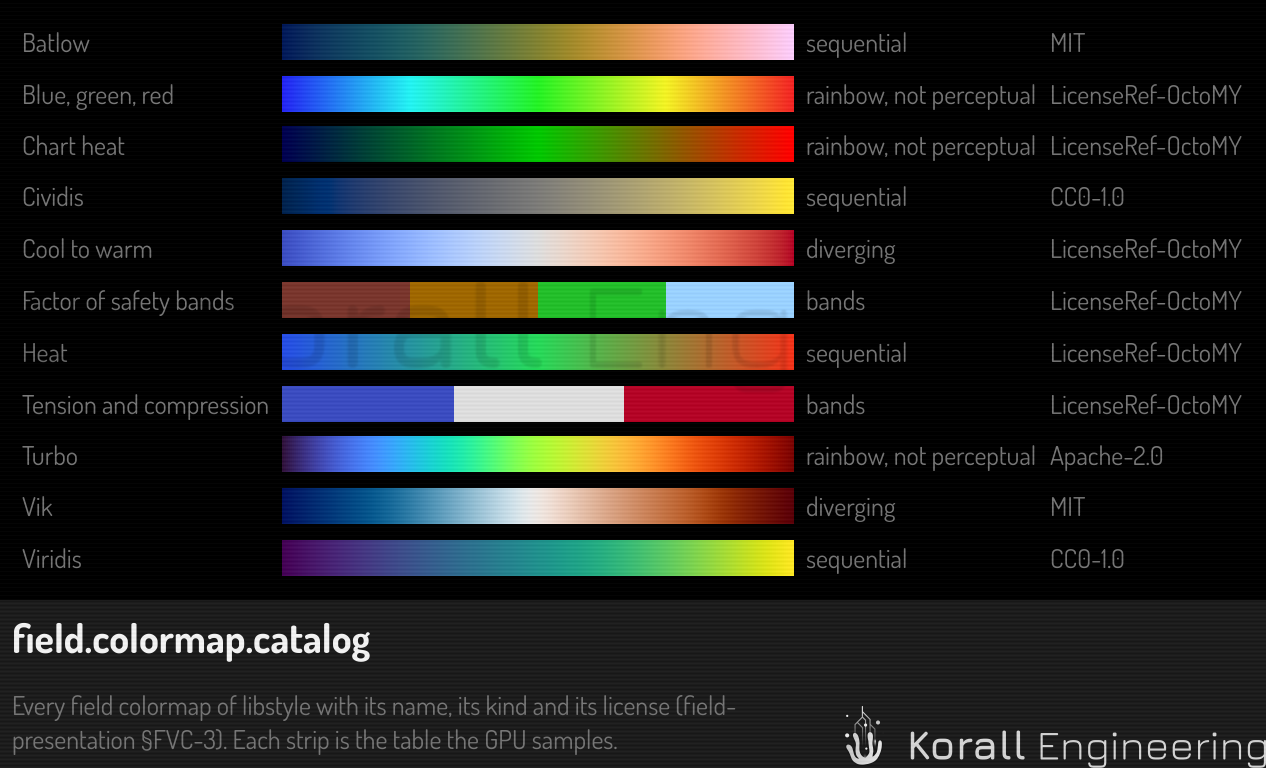
Add :reversed to an id to read the map the other way. The factor of
safety of a solve shows in fos-bands, with a targets range.
Color vision
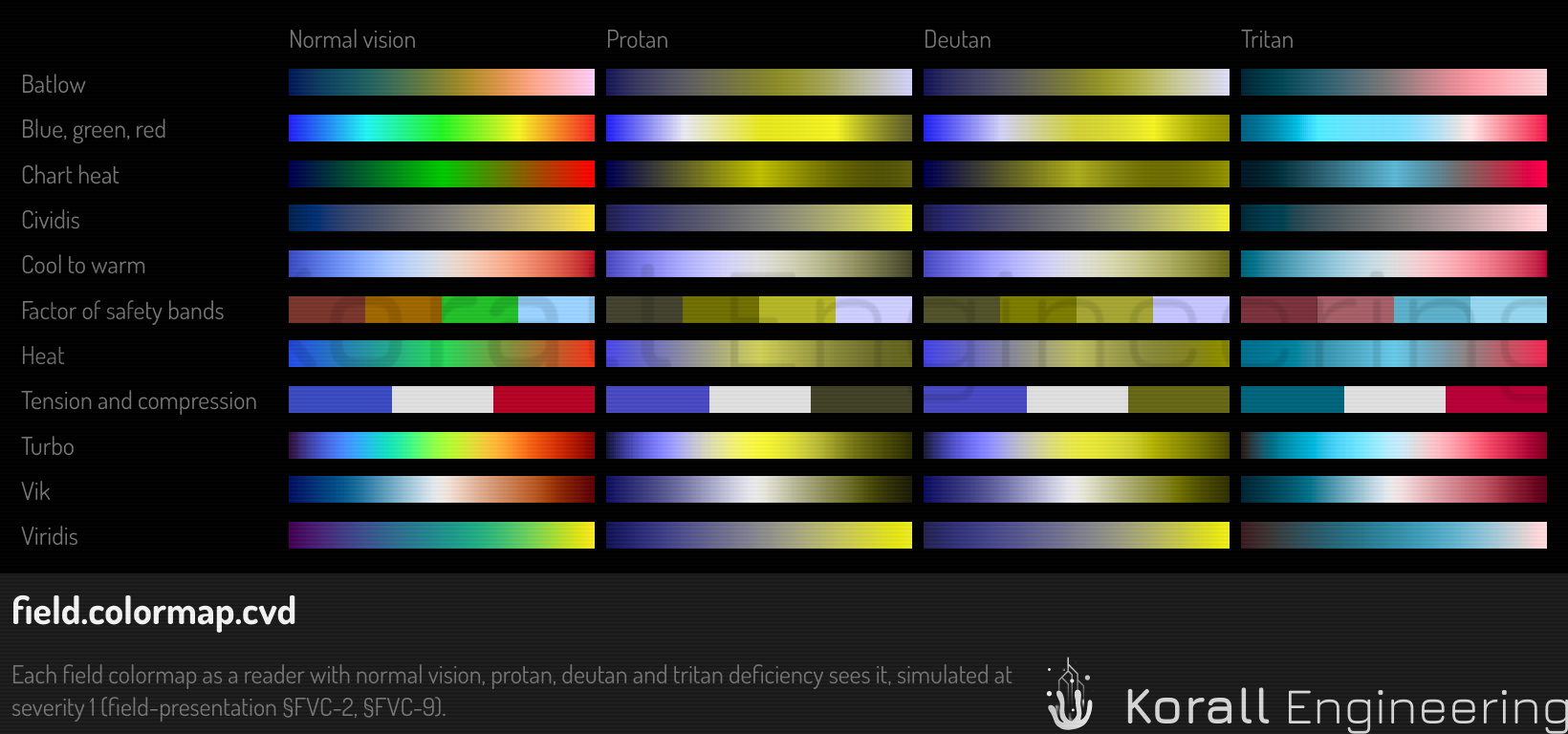
viridis, cividis, batlow, cool-warm and vik stay readable for a
reader with a color vision deficiency. The tests check each map under a
simulation of protan, deutan and tritan vision: a sequential map gets
lighter from end to end, and two entries 1/16 of the map apart differ by a
CIE76 ΔE of at least 3. The rainbow maps fail that check, and the menu says
so.
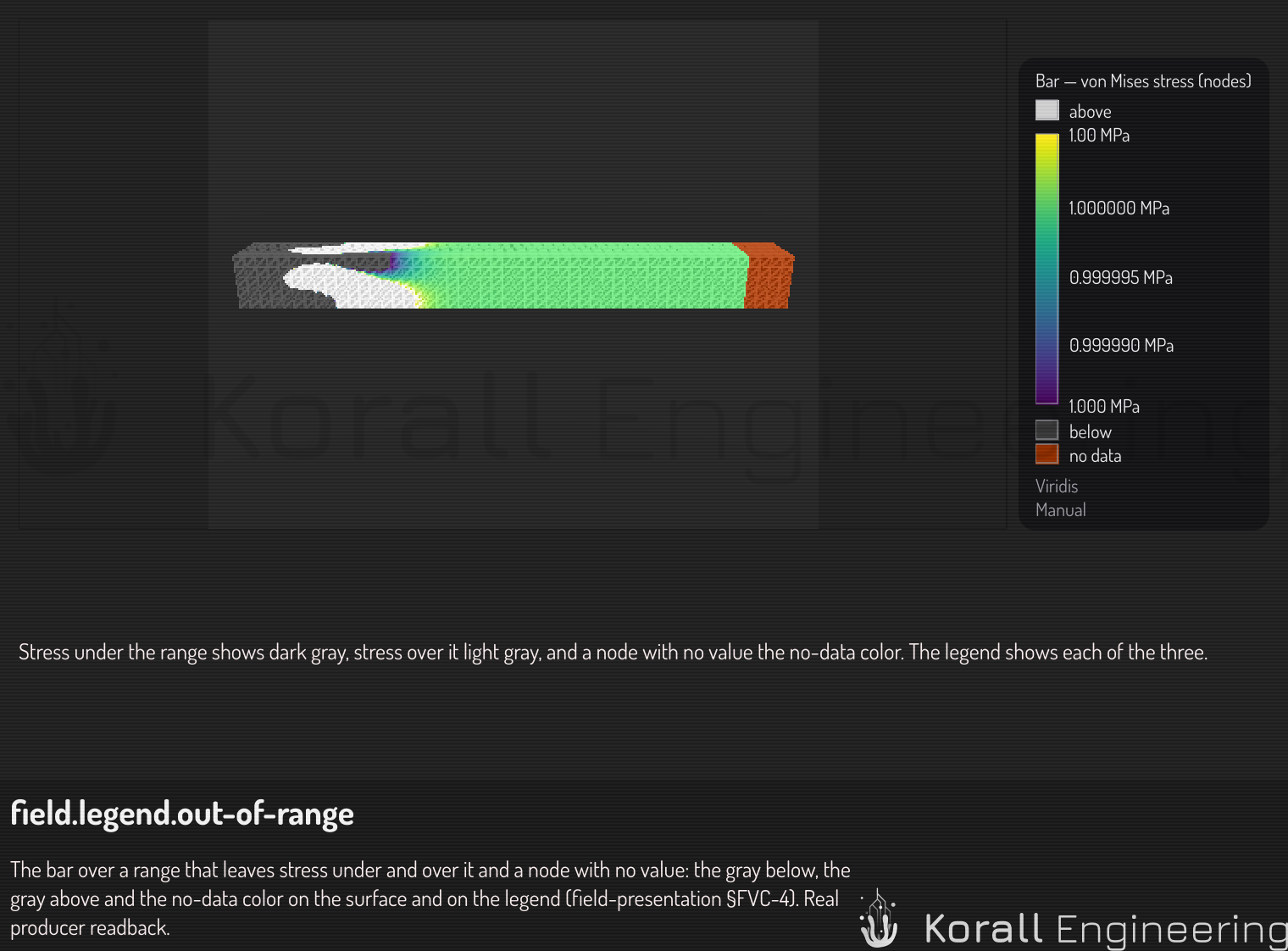
Values outside the range
| Value | Color |
|---|---|
| Below the range | A dark gray |
| Above the range | A light gray |
| No data (NaN) | One color per map, far from every color of the map and from both grays, for every reader |
The color presenter chooses what a value outside the range shows, with the
key outOfRange:
outOfRange |
Below or above the range |
|---|---|
distinct |
The grays above. The default |
clamp |
The end color, with "≤" or "≥" beside the legend |
hide |
Nothing. The legend says "Values outside the range hidden" |
The legend shows a swatch for each gray that the data reaches, and a no-data swatch when the field holds a NaN.
A surface that shows a field is lit with a limited light: the shading
changes its color by at most ΔE 12 from the legend's color. Set
lighting to flat in the color presenter for the legend's exact color.
Bands and the log scale
Set bands in the color presenter to a number from 2 to 24 for flat steps of
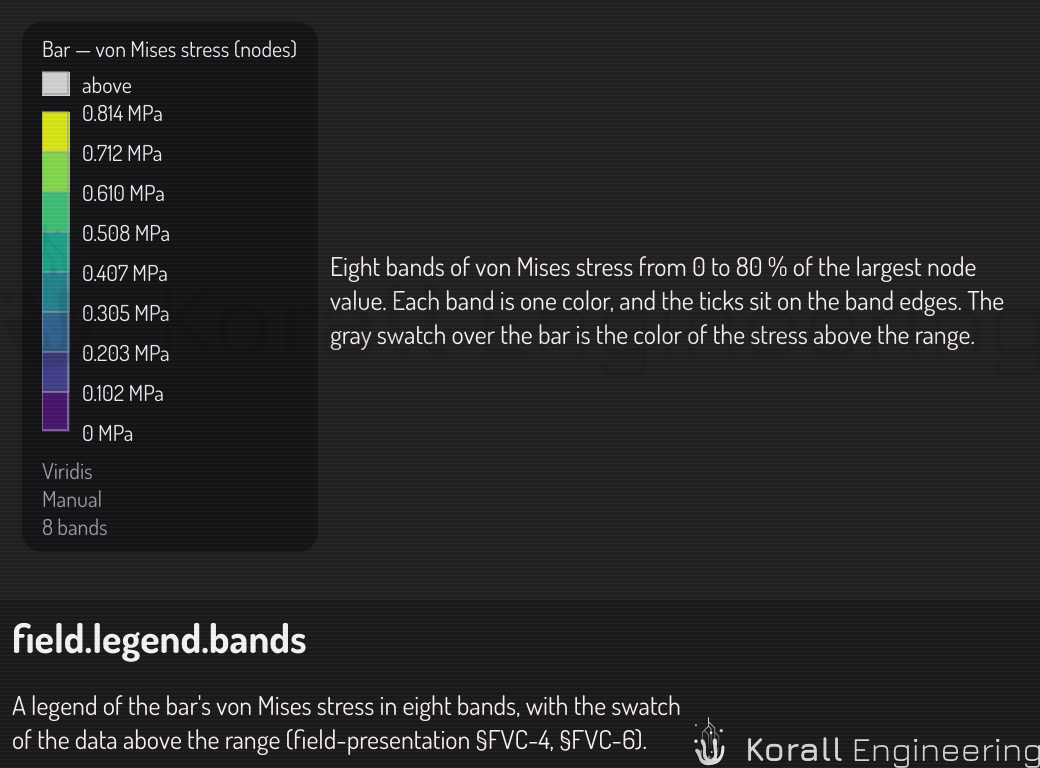
color. Each band is the map's color at the band's center, and the legend
puts its ticks on the band edges. Set scale to log for a log scale. A
range that holds 0 or a negative value refuses it, and the legend says why.
The legend's ticks
The two ends of the legend show the exact range. The ticks between them are round numbers: 1, 2 or 5 times a power of ten. Each tick has the unit.
Add a colormap
A colormap is data, so a new one needs no code. Add a colormap tells how.
Two items in one place
Where two items cover the same surface, each pass moves its depth toward the camera by a small amount from a key. The key comes from the item. This gives three modes:
| Mode | Where | What you see |
|---|---|---|
Pattern |
The editor viewport | A checker of 8-pixel squares, one item in each square. A hovered or selected item wins every square |
FixedOrder |
Rendered images, videos and thumbnails | One stable winner by item type, the SDF first, with no pattern |
Off |
Diagnostics | The surfaces fight, pixel by pixel |
The move is under a pixel, and a pick takes it back out, so a pick returns the true surface point. For how this looks in the viewport, see Two items in one place.